Report. Forecast. Maintain.
LIFECYCLE INSIGHTS FOR CONTENT MANAGER
How is your organisation tracking?
BeekonLite can tell you, in seconds. It's that quick.
Try free for 6 months
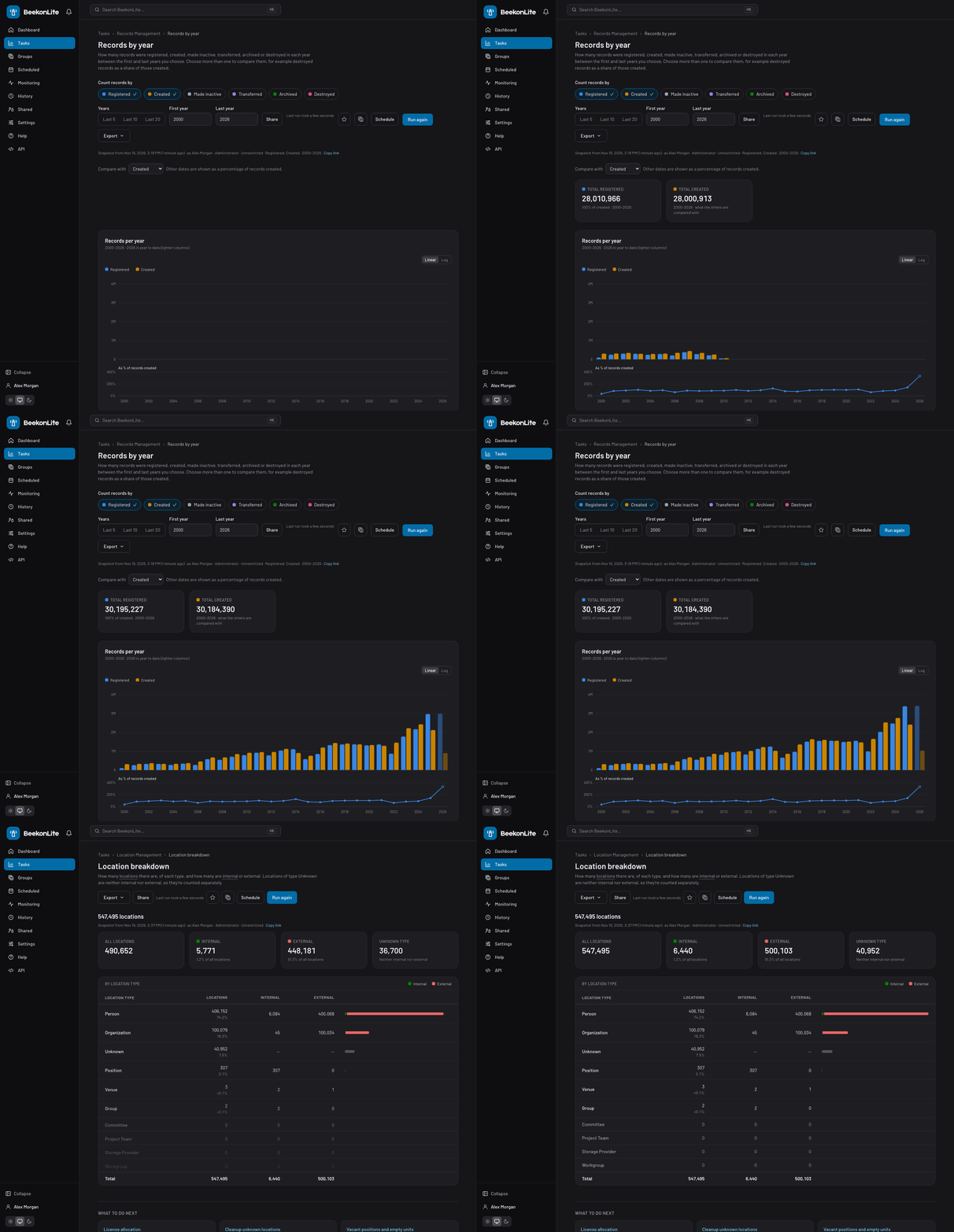
THE BEEKONLITE PORTAL... A LIGHTNING FAST UI.
Save days of admin time
Clean up duplicates, find inactive users, sort out unknown locations, release checked-out records and review licence use, without days of manual searching and spreadsheets.
Reduce risk and stay compliant
Find records with no retention schedule, see whether disposal is keeping pace, and spot people who have left but still have access, before they become audit findings.
Give management clear answers
Produce forecasts and reports in seconds, with no custom SQL or specialist help needed.
How does it work?
Deploy the app in minutes.
Sign in with your existing Microsoft, Okta or other company login. No new passwords.
Run a report, or schedule it. Most finish in seconds, and big ones run in the background while you carry on.
Review the results: charts, filters, what's new since last time, and exports to Excel.
Fix what it finds: merge duplicates, deactivate leavers and release checkouts, with Content Manager's own security applied.
Share and stay informed: share results with colleagues, and have scheduled reports post to Slack or Teams.
Features
Forecast
See how your collection is growing, which record types are driving it, whether destruction is keeping pace, and when your document stores will fill up.
Retention and disposal
Find records with no retention schedule, see what's due for disposal and what holds are blocking, and check classifications and schedules that are never used.
Automation and sharing
Group your regular reports and run them with one click, schedule them to run on their own and post results to Slack or Teams, share results with colleagues, and export any result to Excel or CSV.
Location clean-up
Find and merge duplicate people and organisations, clean up unknown locations, link people to their organisations by email, and find people with no position or business unit, no email address, or set as internal when they should be external (or the other way round).
Users and licences
See who's actually using Content Manager and when, review licence allocation by user type, check who has administrator or records manager rights, and audit any user or position before they leave: their records, actions and workflows.
Documents and storage
See how full each document store is, which formats you hold and your largest documents.
Records health
Find records checked out and forgotten, records away from their home location, records still held by people who have left, missing physical records and documents, and empty containers. Review how each record type is set up and used.
Security and process
Count records and locations by security level and caveat, and find overdue actions, activities, workflows and requests.
THE FULL SUITE OF REPORTS
ARCHIVING, CLASSIFICATION, LIFECYCLE AND RETENTION• Classifications with or without records: How many records are filed in each classification, and which have none.
• Disposal review: How much of what falls due for destruction is being destroyed, compared between two periods, and how many records are overdue.
• Holds and what they block: Every hold, how many records it holds, and how many are past their destruction date.
• Lifecycle status: Where every record is in its lifecycle, and which records will never fall due for disposal.
• Records due for disposition change: How many records are due to be made inactive, transferred, archived or destroyed, now and in future years.
• Schedules with or without records: How many records are on each retention schedule, and which have none.ELECTRONIC DOCUMENT MANAGEMENT• Document store usage: How much each document store holds, its free space and status, and how many records are in it.
• Documents by format: How many electronic documents there are of each file format.
• Largest documents: The 500 largest electronic documents, with their format and who created them.
• Records by edit status: How many records are checked in, checked out, final, managed in place or not electronic.
• Records currently checked out: Which records are checked out, to whom and since when, and undo their checkout.
• Records with missing documents: Records whose electronic document Content Manager couldn't find in its document store.FORECASTING• Disposal backlog forecast: Whether the backlog of records overdue for destruction will shrink or grow: falling due, destroyed and left waiting each year.
• Growth by record type: Which record types are driving growth, with a forecast for each.
• Lifecycle forecast: Whether the collection is still growing: records registered and destroyed each year, and where that is heading.
• Storage forecast: How much the document stores will hold in the years ahead, and whether they will fill.LOCATION MANAGEMENT• Cleanup unknown locations: Count locations of type Unknown, delete those that aren't a contact on any record, and merge those that share an email address.
• Duplicate email addresses: Find email addresses used by more than one location.
• Duplicate names: Find names used by more than one location.
• Internal people without an email address: Internal people with no email address, who don't get workflow, action or request notifications.
• Licence allocation: How many users can log in on each user licence type, and who they are.
• Location breakdown: How many locations there are, of each type, and how many are internal or external.
• Mismatched internal and external people: Internal people whose email isn't at an internal domain, and external people whose email is.
• Missing organisation links by email: Find external people with no organisation whose email is at an external organisation's domain.
• People with no memberships: Internal people who aren't in any position, business unit, organisation or group, and disabling their login or deactivating them.
• User or position audit: Find an internal, active user or position and audit it.
• Vacant positions and empty units: Internal positions, business units, groups and teams with no one in them.
• Who's using Content Manager: See who has used Content Manager and when, find users who can log in but haven't, and disable their login or deactivate them.PROCESS MANAGEMENT• Action audit: Counts of record actions, in total or by year started, and every open one with who has it.
• Activity audit: Counts of workflow activities, in total or by year assigned, and every open one with who has it.
• Overdue actions/activities by person: Workflow activities and record actions past due and not done, by who they're assigned to.
• Workflow audit: Completed workflows, and every open one with its due date, progress, supervisor and who has the current activities.RECORDS MANAGEMENT• Empty containers: How many folders of each record type have nothing in them.
• Missing physical records: Physical records Content Manager has as missing, and where they belong.
• Outstanding record requests: Requests for records that haven't been completed, and how long they've waited.
• Record type configuration review: What each record type gives new records: default retention schedule, classification requirement and security.
• Record type usage review: Every active and inactive record type, how many records it has, when it was last used, and which have never been used.
• Records by disposition: How many records there are at each disposition, such as Active, Inactive or Destroyed.
• Records by year: How many records were registered, created, made inactive, transferred, archived or destroyed each year, and how they compare.
• Records held by inactive people: Records whose owner, home or assignee is someone who's left or a place that's no longer active.
• Records not enclosed or at home: Records that aren't enclosed in their container, or aren't at their home location, and who has them now.
• Who's registering records: Records registered in the last 30 days, 3 months or 12 months, by person and by business unit.SECURITY• Locations by security level and caveat: How many locations have each security level and each security caveat.
• Privileged accounts review: Everyone with Administrator or Records Manager access, whether they can still log in, and when they were last active.
• Records by security level and caveat: How many records there are at each security level, and how many have each security caveat.THESAURUS TERMS• Thesaurus terms with or without records: How many records each thesaurus term is attached to, and which have none.+ More to come
Setup
INSTALL IT YOUR WAY
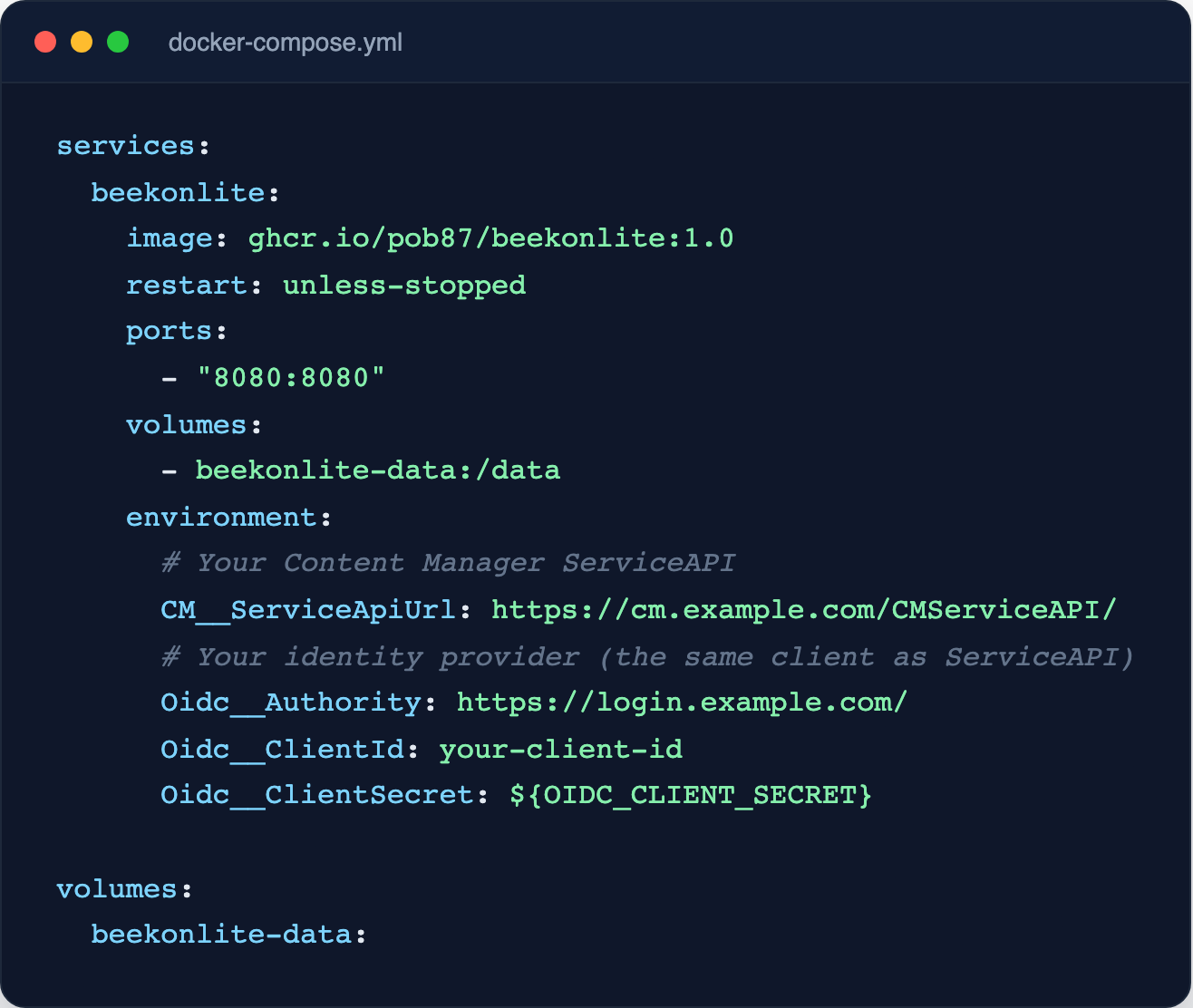
BeekonLite runs as a single container: start it with one Docker command, keep its settings in a Docker Compose file, or run it on your Kubernetes cluster. Our setup guide walks you through each option.
Lightweight and secure by design
BeekonLite is a single container of around 200 MB, built on Microsoft's minimal "chiseled" Ubuntu image, with no shell or package manager, running as a non-root user. It runs on any Linux server or cluster, on Intel/AMD or ARM processors. Its built-in database means no separate database server is needed; to run more than one copy, connect it to your PostgreSQL.
What you need
• OpenText Content Manager with ServiceAPI, set up to sign in with OpenID Connect
• An identity provider you already use: Microsoft Entra ID, Okta, ADFS, Keycloak, Auth0 or any other OpenID Connect provider
• A Linux server running Docker (Intel or ARM), or a Kubernetes cluster
• An HTTPS address for BeekonLite, through your existing reverse proxy or ingress
• A small amount of persistent storage for BeekonLite's data, or your own PostgreSQL database if you'll run more than one copy
SECURE
• Runs on your own infrastructure, as a single container. Your Content Manager data stays on your network; nothing is sent elsewhere unless you turn on Slack or Teams notifications.
• No shared service account: everyone works as themselves, with Content Manager's own security and audit.
• Single sign-on with any OpenID Connect provider (Entra ID, Okta, ADFS, Keycloak and others). No passwords stored; sign-in tokens never reach the browser.
• You control access: by default only Content Manager administrators can run reports, and sharing is off until you turn it on.
• Every release is scanned for vulnerabilities and isn't published with a known high or critical issue that has a fix.
Up and running in five steps
Register BeekonLite with your identity provider: use the same application ServiceAPI uses, add BeekonLite's sign-in and sign-out addresses, and allow refresh tokens.
Start the container: one command, with your ServiceAPI address and sign-in details. A built-in database is included, so no database server is needed.
Put it behind HTTPS with your reverse proxy.
Sign in and enter your licence key. A Content Manager administrator does this once.
Check Settings: add your Web Client address and internal email domains, and BeekonLite's checklist on the Dashboard guides you through the rest.